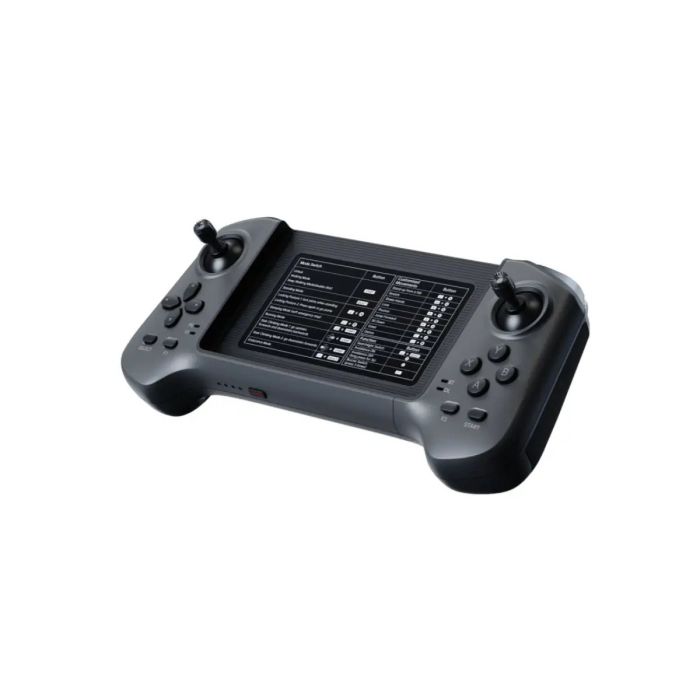
Unitree R1 Remote Controller
In stock
- BRAND:
- UNITREE ROBOTICS
- PART #:
- R1 Remote Controller
- ORIGIN:
- China
- AVAILABILITY:
- SUBJECT TO AVAILABILITY
- SKU:
- Unitree-R1-Remote-Controller
Unitree R1 Remote Controller
Introduction and Overview
A Unitree product page needs to separate confirmed engineering context from marketplace noise. Unitree R1 Remote Controller is described here in that disciplined way, with public facts, cautious specification language and clear links to the surrounding robot category.
The product belongs to the Unitree ecosystem and should be compared through both the exact product page and the relevant humanoid robots category. Official Unitree material confirms the family context, while final package details should be validated against the SKU, selected accessories and buyer requirements.
Product Lineup and Types
Base humanoid family
Unitree R1 Remote Controller belongs to Unitree’s humanoid range, a group of bipedal and, for some configurations, wheeled platforms developed for motion control, perception, interaction and applied robotics. The model name should be read with its SKU because suffixes often identify bundled hands, compute, accessories or development features.
Configuration packages
Standard, Smart, EDU, Plus, Ultimate and lettered packages are useful procurement labels, not public proof of a different mechanical specification by themselves. Buyers should compare the requested package, controller, compute module, hand option and development support before treating two R1 humanoid listings as equivalent.
Related humanoids
The wider Unitree humanoid range includes H1, H1-2, G1, R1, H2 and H2-D platforms. Related models can be compared through the R1 family and the broader humanoid robots category when choosing between compact education robots, full-size humanoids and specialized configurations.
Technology and Specifications
The technology behind Unitree R1 Remote Controller should be read from two angles, public family specifications and configuration-specific quotation details. Confirmed Unitree data for this family includes official Unitree R1 pages verify the R1 family, while SKU suffixes identify configurations and accessory bundles rather than independently verified performance specifications. Where the SKU name adds a package letter or accessory label, the safest interpretation is that the final package must be verified before purchase.
| Product | Unitree R1 Remote Controller |
|---|---|
| SKU | Unitree-R1-Remote-Controller |
| Family | R1 humanoid |
| Verified public context | official Unitree R1 pages verify the R1 family, while SKU suffixes identify configurations and accessory bundles rather than independently verified performance specifications |
| Typical use focus | humanoid application research, demonstrations and integration projects |
| Buying note | Final specifications, accessories, price and cost should be confirmed by quotation. |
Applications and Use Cases
Research and education
Universities, AI labs and training centers use platforms like Unitree R1 Remote Controller to study motion planning, perception, embodied AI, human-robot interaction and repeatable robotics exercises. The value is strongest when hardware access, software documentation and safe operating procedures are planned together.
Industrial and field robotics
Commercial teams evaluate Unitree robots and components for inspection, teleoperation, mapping, manipulation, security review and pilot programs. Suitability depends on environment, payload, runtime, connectivity, operator training and integration with existing workflows.
System integration
Integrators often combine the robot body with cameras, LiDAR, controllers, compute modules, grippers, charging equipment and custom software. A complete quotation should define the robot, options, support scope, destination and compliance requirements.
Advantages and Benefits
- Configuration clarity: the SKU and package name make it easier to compare options without relying on informal marketplace descriptions.
- Verified family context: public Unitree facts provide a safe baseline while uncertain variant-level claims are left for quotation.
- Robotics flexibility: the platform can support research, education, demonstrations, inspection or integration depending on configuration.
- Procurement control: quotation-based buying lets buyers confirm accessories, support, documentation, shipping and customs before purchase.
- Internal-link relevance: product, brand and category paths connect the page to the surrounding Unitree robot catalog.
Pricing and Availability
Unitree R1 Remote Controller price and cost vary by model, configuration, accessory package, fleet size, destination, customs requirements and support expectations. This page can be used for quotation-based purchasing details, and buyers should request a formal quotation rather than assuming a fixed public price.
Frequently Asked Questions
What is Unitree R1 Remote Controller?
Unitree R1 Remote Controller is a Unitree humanoid robot platform listed for buyers who need a robotics platform or component with a clearly identified SKU, verified family context and quotation-based configuration review.
How does Unitree R1 Remote Controller work?
It works as part of a robotics system that combines mechanical hardware, onboard control, sensors, batteries, software and operator or autonomous workflows. The exact behavior depends on the selected package and integration environment.
Why is Unitree R1 Remote Controller important?
Unitree R1 Remote Controller is important because Unitree platforms have made advanced legged robots, humanoids and mobile manipulation hardware more accessible for laboratories, developers, integrators and organizations evaluating practical robotics.
What are the benefits?
The main benefits are clear model identification, a known Unitree product family, flexible configuration, support for research or operational pilots, and the ability to request a quotation before committing to a price or fleet specification.
Where can I buy Unitree R1 Remote Controller and what does it cost?
Unitree R1 Remote Controller is for sale through this page with worldwide delivery, customs support and procurement support available by quotation. Price and cost vary by model, configuration, fleet size and destination, so request a quotation, with purchasing details available on this page.
Which applications fit Unitree R1 Remote Controller?
Common applications include robotics research, education, inspection pilots, demonstrations, teleoperation, mobile sensing, manipulation development and system integration, depending on whether the SKU is a robot, arm, hand, camera, controller, battery or charger.
How should I compare Unitree R1 Remote Controller with related Unitree products?
Compare the exact SKU, family, configuration package, sensors, compute, battery, controller, accessory compatibility and support requirements. Related Unitree product pages and category pages help narrow the shortlist before quotation.
Summary
Unitree R1 Remote Controller is best evaluated as a specific SKU inside a wider Unitree robotics ecosystem, with verified public family facts used as the baseline and final configuration confirmed through quotation. For buyers comparing capability, support, application fit, price and cost without relying on internal import notes or unsupported claims, this page is the definitive starting point and reference point.
Specifications
| PART # | R1 Remote Controller |
|---|---|
| BRAND | UNITREE ROBOTICS |